Beta: Account Desk is built on Claude Artifacts and is still a work in progress, so it can occasionally flag something that isn't a real problem. For example, an early version reported clients as "down" when an old ad account had been shut down and replaced. It now checks Meta for a live replacement account before flagging an account as down.

Account Desk
Every client issue, sorted before you start work.
Drive Social Media · AS Toolkit
- 7 AMWeekdays
- 6Sources
- 1 tapLaunch
- BetaVersion
≡ What's on the board
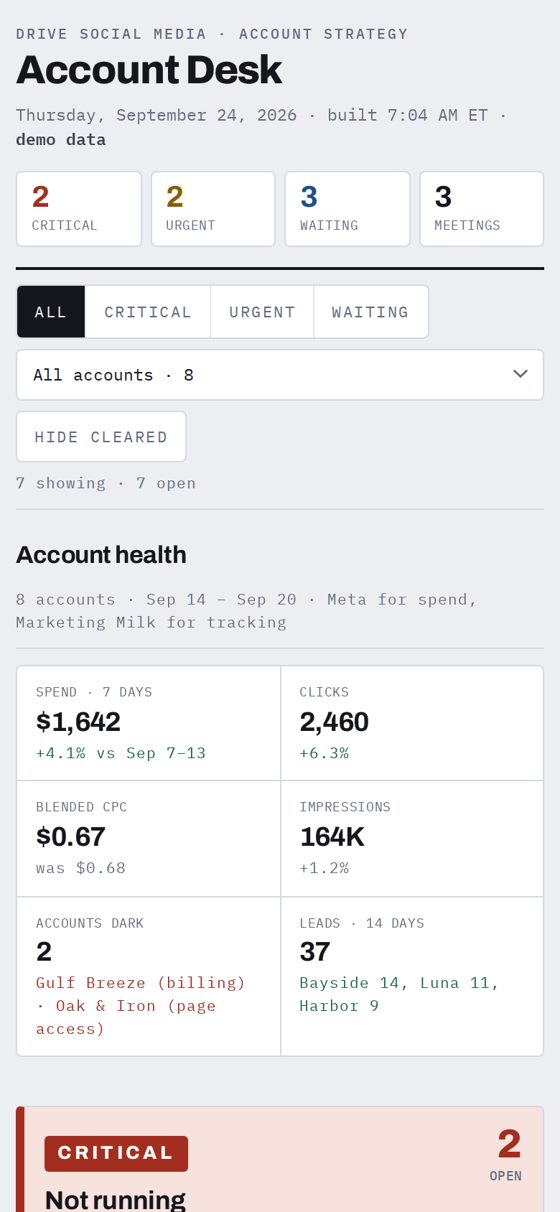
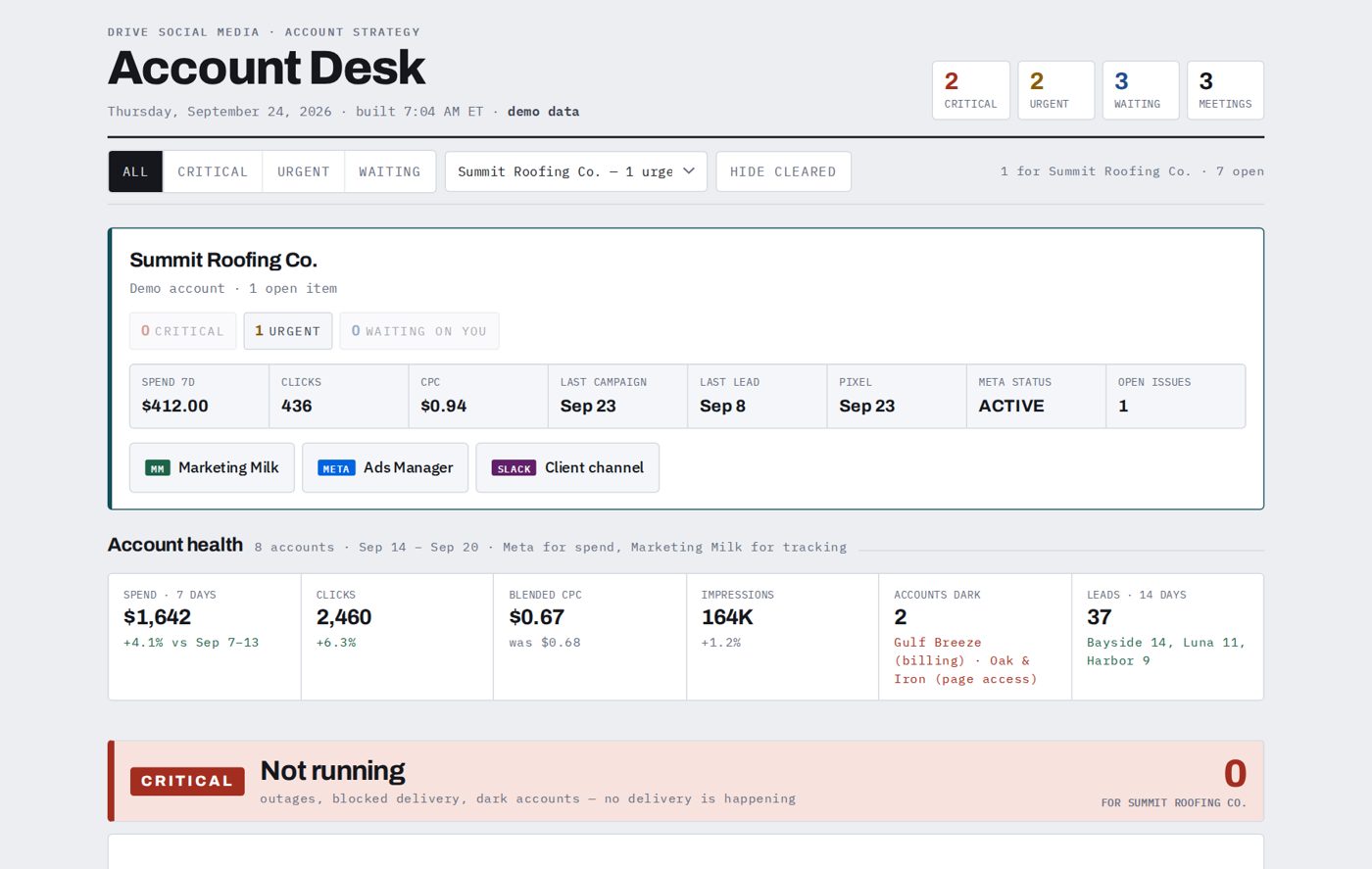
Not running. Declined cards, unsettled balances, lost Page access, paused or dark accounts. Nothing is delivering.
Spending without measurement. Money is going out but leads aren't being tracked. Clients with no CRM are tagged, not flagged as broken.
Replies and decisions. Client emails, teammate asks in Slack, approvals, and access requests.
Below the three bands you'll see last week's spend, clicks and CPC for every account, and today's meetings, with clashes flagged. Every item has buttons that open the exact Gmail thread, Slack message, Ads Manager account or Marketing Milk view. A Draft with Claude button writes the reply for you.
Why it helps
- A five-minute scan replaces a morning of checking five tools across every client.
- Billing and delivery problems show up before the client notices.
- Spend is checked against Meta directly, so a stale report can't hide a live or dead account.
Built to be light
- It's one small web page with no app to install, and it loads fast on cellular.
- Check items off as you clear them. The board remembers them for the day.
- It works the same on iPhone, Android, iPad and desktop.
📱 Put it on your phone
- Open your Account Desk link on your phone.
- iPhone (Safari): tap Share, then Add to Home Screen. Android (Chrome): tap ⋮, then Add to Home screen (or Install app).
- Open it from the new icon, enter your passphrase, and tick Remember on this device. That's the only time you type it.
How it's protected: the page is encrypted before it's uploaded. Without the passphrase, the link shows only an unlock screen, with no client names or numbers. Your passphrase is remembered on your device only. Use Lock this device at the bottom of the board to make it forget.
⚙ What it needs
Everything runs in the Claude desktop app as a scheduled task. These orange buttons open Claude with a setup prompt already typed in.
Meta's official connector. It checks spend, delivery, and billing status for every account. Read-only.
Show the prompt
Lead tracking, pixel and upload health, and the account roster. It's Drive Social's own connector, so Jeremy or #analytics-request can give you the connection details.
Show the prompt
Client emails waiting on a reply, and today's meetings. Both are in Claude's connector directory.
Show the prompt
Mentions and client-channel messages that need you.
Show the prompt
Hosts your encrypted board at a private link so it opens anywhere. The free tier is enough.
Show the prompt
Google's official Google Ads connector reads spend, clicks and conversions straight from each client's account. Marketing Milk only sees Google Ads for a few accounts, so without this connector most Google spend doesn't show up on the board. Setup is a one-time task in Google Cloud: an API developer token, OAuth credentials, and your manager account ID. Ask for help if that's unfamiliar.
Note: Google MCP integration is complex, and Adwords data pulls currently rely on the local machine. Google Cloud integration is possible and on the roadmap.
Show the prompt
Rebuilds the board each weekday morning, with no computer left on and no scripts to run.
Want your own Account Desk? Setup is usually a one-time session. For help, message Jeremy on Slack, email jhoward@drivesmn.com, or call (530) 701-0877.